[Rambling] Turns Out "Compliance" Really Does Hinder Rapid Company Growth? Thoughts on OpenClaw
Using the OpenClaw craze as a starting point, this article explores how compliance requirements are seen as obstacles to rapid business growth in the AI wave, reflecting on the conflict between compliance and business in the traffic-first era.
Recently, OpenClaw has been incredibly hot.
So hot that even family members came to ask about it.

To be honest,
there’s nothing worth riding the wave on.
It’s not fundamentally new — QBot and WeChat bots did the same thing years ago.
And honestly,
most of the features people use don’t even require OpenClaw or an LLM.
Many of today’s so-called “explosive applications”
are just reinventing the wheel, burning tokens for nothing.
But as domestic platforms jumped in quickly —
Tencent, Zhipu, Kimi, Alibaba, and others all launched their own XX Claw —
and even official entities got involved,
I can’t help but wonder:
Turns out, being compliant really does slow a company down.
1. Personal Thoughts on OpenClaw
First, let’s talk about OpenClaw.
After all, it’s all about traffic.
Something New? Not Really
OpenClaw is essentially an AI agent with full system permissions.
If you’re bold enough, you could have achieved most of OpenClaw’s features earlier by using various Code Agents (like Claude Code) at the system’s lowest level (root directory).
As for supposedly integrating various chat apps — that’s been possible for ages with various bots. It’s just API calling.
For example, looking up legal provisions:

In fact, when OpenAI GPT-3.5 first came out, I integrated it into a QQ bot,
directly calling ChatGPT for conversation:

(Looking back, ChatGPT was really dumb back then.)
As for scheduled tasks — like automatically checking the court website at 9:30 AM daily for company announcements, alerting if found, reporting if not:

And the common OpenClaw use cases like checking email (with AI summarization) or browsing hot topics —
All achievable. The core is just the IM (chat app) receiving commands and calling local code scripts to execute. Many steps don’t need a large model at all.
When OpenClaw first became a sensation, I tried it — after all, installation was just one line of script (yes, selling for 299, just one line of script).
I connected a local model (afraid of bill shock), tried it, and deleted it.
My feeling: nothing new. Not very meaningful to me, and still not stable enough.
Is It Useful? Yes, Actually
I can’t say OpenClaw is completely useless.
(At least it’s useful for burning excess tokens.)
When I used to share AI knowledge, I’d suggest people learn a bit of programming so they could use AI to create tools to make their work easier, instead of just copy-pasting in a chat window.
Of course, I’d often hear sighs and groans from the audience.
I get it — programming is “hard to learn.”
OpenClaw’s appearance has indeed given many ordinary people a taste of “one-sentence programming.”
That said, directly calling an LLM for real-time workflow can indeed achieve a lot of “smarter” work.
Compared to painstaking manual programming — reading documentation to access APIs, building scrapers, etc. — to create stable workflows, this is much simpler.
As long as you don’t look at the token bill.
Pseudo-Scenarios Everywhere
Lately, there have been tons of “OpenClaw Beginner’s Guides” — from videos to live streams, courses and content
covering everything from introduction to installation, use cases, and future visions. Very comprehensive.
It’s a perfect replica of the earlier Deepseek, Dify, and Coze crazes.
Interestingly, the use cases are still the classics:
“AI helps you review contracts (summarizing content, giving revision suggestions)”
“AI automatically summarizes emails and suggests replies”
“AI automatically looks up legal provisions and cases”
No different from earlier workflows at all.
The only change is the entry point — now it’s sent from Feishu or QQ instead.
The difference is that workflows can limit what AI can do.
What OpenClaw does isn’t something the user gets to decide.
2. Compliance, Ultimately, Can’t Beat “Traffic”
There’s a classic image that legal professionals and lawyers often use to joke about themselves:

I used to think the business side didn’t understand us — that compliance was a thankless task.
But with OpenClaw, I realized it’s actually true.
Honestly, I Wouldn’t Allow These Tools to Go Live Either
Looking at OpenClaw’s use cases and permissions, it basically ignores all laws.
The Data Security Law, the Personal Information Protection Law, the Cybersecurity Law —
all ignored.
OpenClaw is really not “groundbreaking” — don’t believe the marketing hype.
Any AI company, or even any developer, could have built this before.
(Of course, someone will say: “If you’re so smart, why didn’t you build it yourself? Sour grapes.”)
The reason they didn’t might just be
compliance concerns.
Seriously — directly scanning drives, reading all kinds of user documents and text, then uploading them to its own servers?
Any legal professional hearing a product manager propose this would get goosebumps.
Even if I wrote one myself, I’d be afraid that open-sourcing it would get the authorities knocking on my door for aiding gray-market operations.
But as Mr. Li said:

This “lobster fever” shows us:
In the face of so-called “AI efficiency,” nobody cares about risks.
People will rush to install it without understanding the specific risks, or even knowing the risks.
Even if they can’t install it themselves, they’ll pay someone to do it.
So, really, people don’t care much about these risks.
Even some official entities don’t seem to care.
What Compliance Risks Does OpenClaw Have?
Plenty.
OpenClaw has the highest system permissions (the latest version defaults to off, but everyone will probably turn it back on).
It can execute search, read, delete, and various other commands.
It can run the browser, query environment variables, directly control keyboard and mouse (write a script), capture keyboard and mouse data, etc.
Even ignoring the risk of installing hacker Skills that could lead to abnormal control or data leaks,
just being able to read all kinds of documents on the computer — reading and uploading each one to the AI provider (to determine if it meets task requirements) — is enough of a privacy risk.
What’s more, most people who install it don’t know how to check the logs — they have no idea what AI read or did.
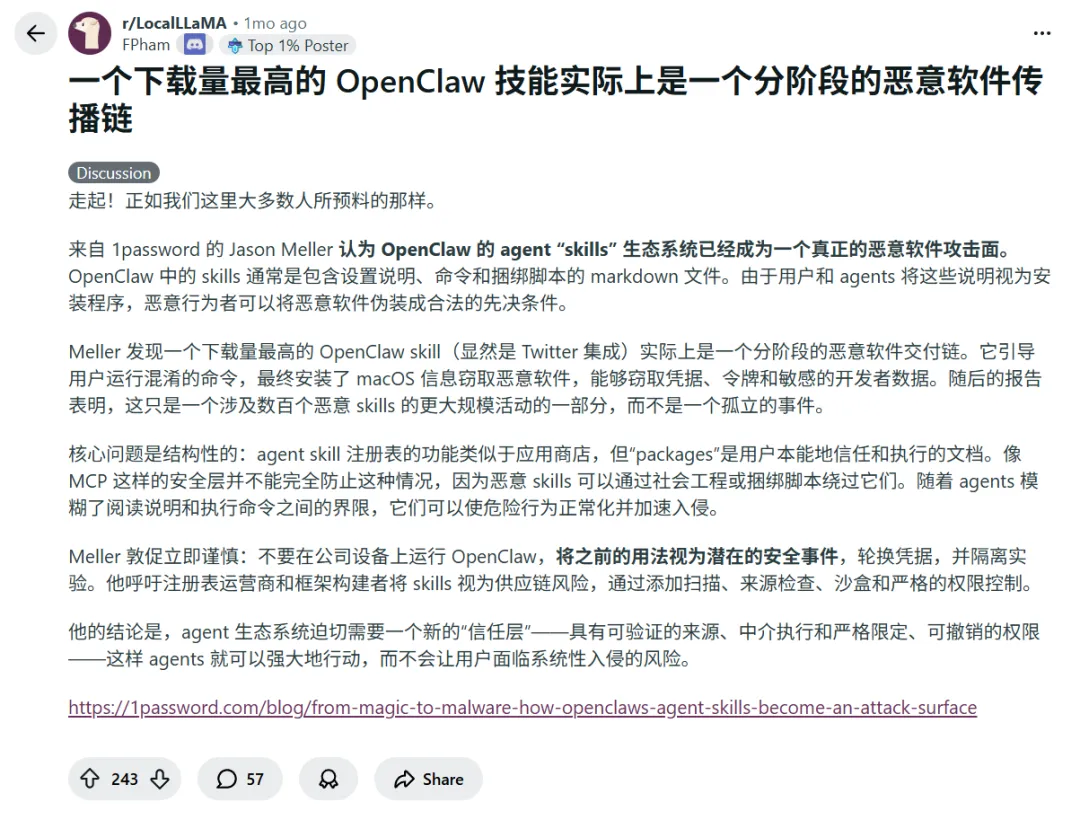
And on ClawHub, hacker Skills are already proliferating:
Next Time Someone Says “Compliance First,” Will the Business Side Listen?
After a certain local government entity officially stepped in, various companies cranked out their own Claw within days. This shows it’s not hard at all to build — they might have even built it in advance.
After all, nobody would just wrap the official OpenClaw’s millions of lines of garbage code.
The hard part was always the “compliance opinions” the legal team raised.
Next time — listen or not?
If they listen, they might miss the boat.
And risk being called “copycats” or “rip-offs.”
But what’s even more interesting: many peers — both legal professionals and lawyers —
talk about “data compliance in the AI era” on one hand, while rushing to teach “OpenClaw” courses on the other.
Even when major official entities say it’s unreliable, they’re still keen on giving courses and live streams.
Got it — it’s still business.
Whether OpenClaw is compliant or not doesn’t matter.
What matters is: don’t hold things back.
Traffic matters more.
After all, Banfo said it too:

3. No Conclusion
Just chatting — no need to elevate it.
Not going to write about “how to use OpenClaw compliantly” or “how to avoid risks.”
More words are useless.
The solution is just a virtual environment (like Docker) plus a local model.
For ordinary people, that’s even harder.
Everyone just wants to ride the trend.
I don’t even expect this article to get much traffic.

Compared to chasing trends, I prefer making something more useful.
Like a “one-network message monitoring assistant” that doesn’t need AI (LLM) at all.

Auto-login, auto-anti-disconnect, auto-detect new messages.
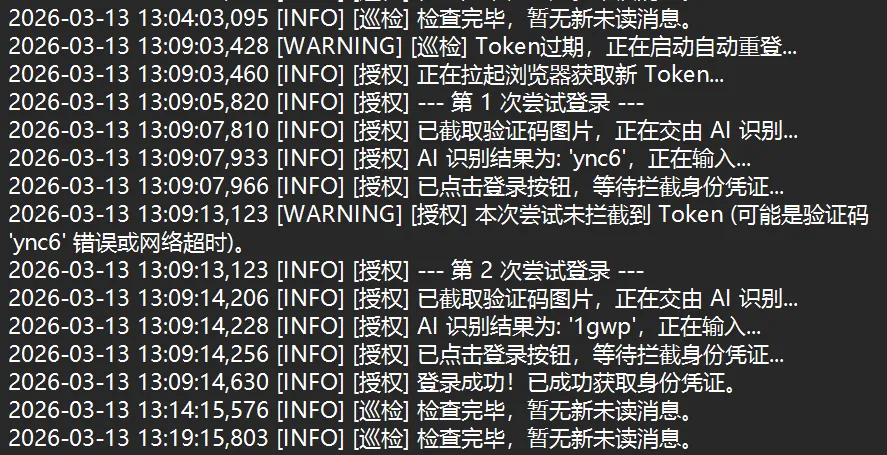
Completely token-free.